WORKSTATION OPTIMIZATION
Office Set-Up
Computer Monitor: Top of screen in line with eyes. 18”-30” away from your face. Your screen should be directly in front of you, not off to one side. If need be, tilt your screen up slightly, so that you can see all of it with one glance.
Keyboard and Mouse: Directly under hands when forearms are parallel to the ground/elbows are approximately 90 degrees. Mouse should be next to keyboard.

Laptops: Ideally should be used on a laptop stand with an external keyboard and mouse. If additional hardware is not available, mitigate by placing laptop at chest height.
Standing Desk: The ideal desk height allows you to position your monitor and keyboard according to the specifications listed above.
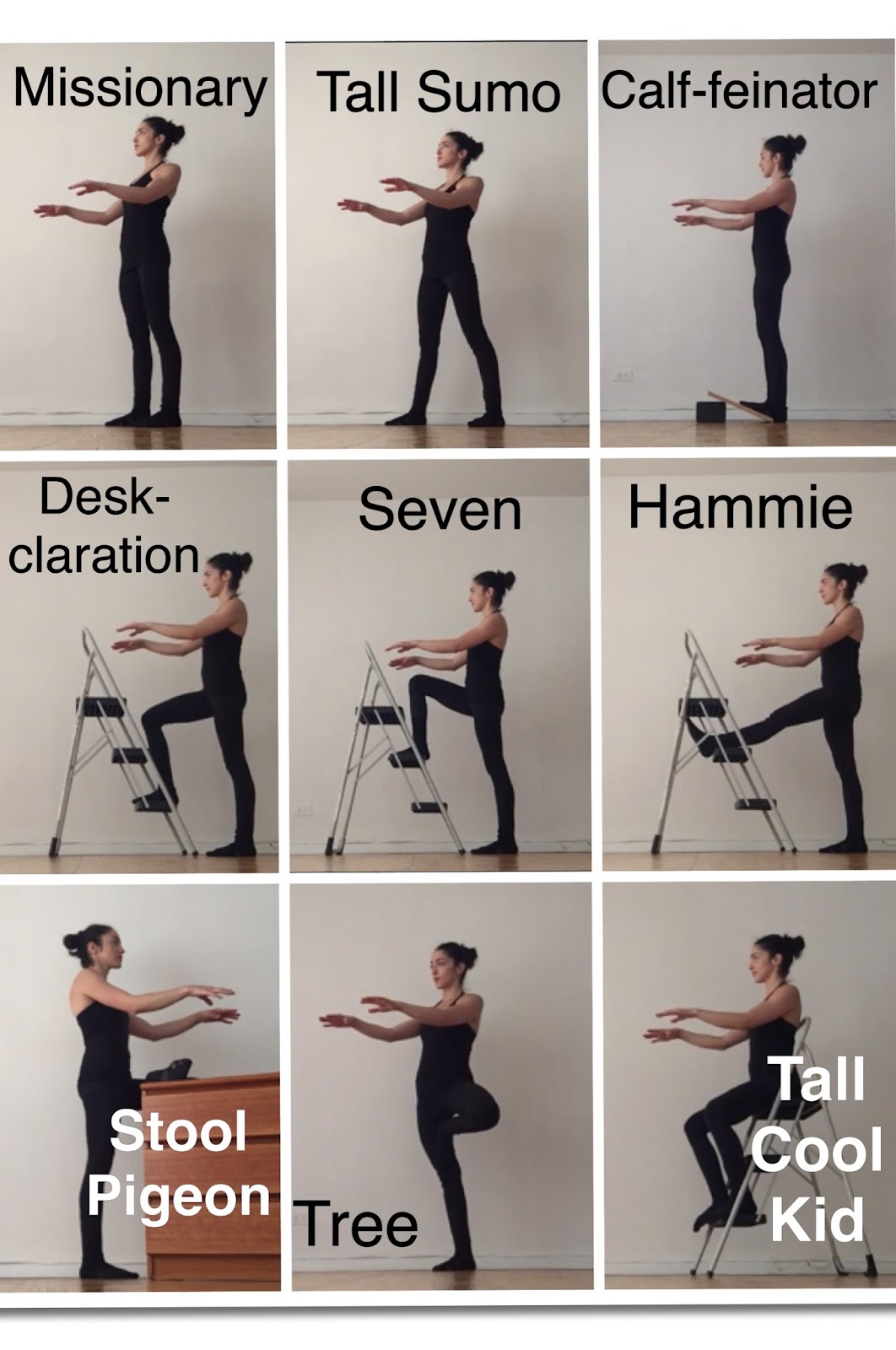
Standing Desk Stool: You should have a hard, tall stool (seat should be at butt height) available for changing positions throughout the day. Here are the main positions you should assume while operating a standing desk:

Slant board or kickstand: Having a slant board, box, block, or step to place one or both feet on is crucial for stabilizing your pelvis and hips. Here are additional positions for operating a standing desk:
Sitting Desk: The ideal desk height allows you to position your monitor and keyboard according to the specifications listed above.
Sitting Desk Chair: The ideal sitting desk chair is sturdy wood or metal, has no arms or back rest. The sturdiness allows you to keep your braced-neutral spine, the armlessness allows more versatility with keyboard and desk placement. If you do have a chair with a back, or even a cushy chair, you can still do your best to be in a good position. Here are some sitting pointers:
- Always go through the bracing sequence before sitting and before changing positions.
- Attempt to sit near the edge of your chair on your sitz bones.
- Always have your feet on a hard, stable surface. This is an overlooked and crucial point. If your feet are dangling or unstabilized, your calves will shorten, and your knees and lower back will ache. If your feet do not reach the floor, a slant board, box, or blocks should be used under your desk.
- Change positions every 30 minutes. Each time you change, stand up, brace and enter a new seated position. Here are some ideas for changing positions:

Sitting on the floor: This is the best possible option for sitting for several reasons. 1) Sitting on the floor balances weight over your pelvis and allows you to stack and brace your spine. 2) Sitting on the floor requires you to get up and down off the floor, a skill that is often lost to immobility and weakness. 3) Sitting on the ground is custom-fit to your body, no need to size-up the perfect chair!
The ideal sitting position for the ground is the lotus posture, a cross-legged position where each foot is placed on the opposite thigh. If you have difficulty getting into this position, sit cross-legged, and work on your hip mobility. Here are several other sitting positions that are suitable for the floor:

